
Fast Scanning & Organize
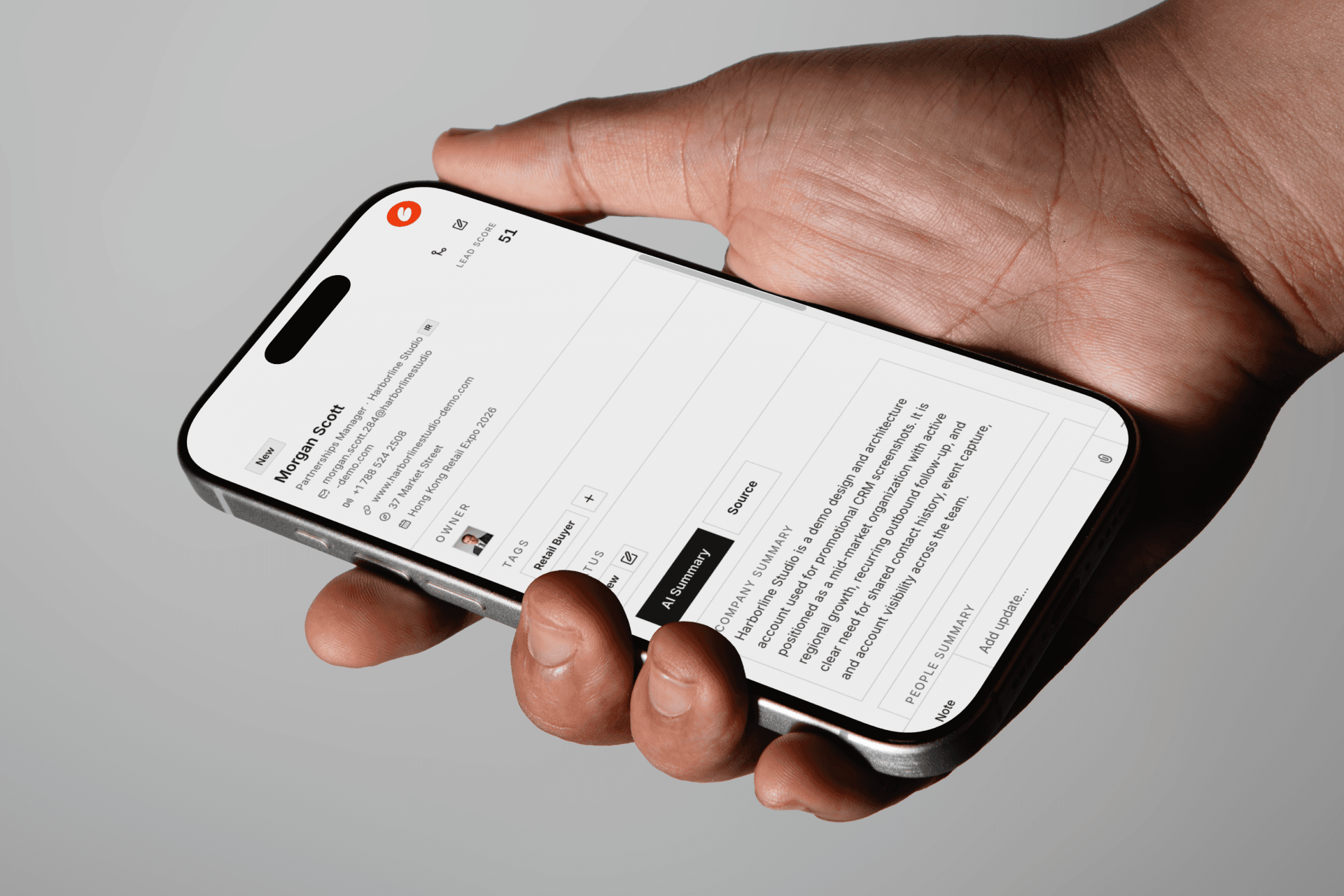
Capture business cards in seconds on a busy exhibition floor and keep every new lead organized instantly for follow-up.
Turn a collected business card into a organized contact list with advanced AI business analysis in a seconds.
 Sync across all devices and work as a team
 Works directly from your Telegram agent bot
 AI reviews, scores, and suggests follow-up
Alicia Wong
Partnerships Lead · Beacon Retail
Lead score
91
Owner
Assignees
Company
Beacon Retail operates across multiple APAC markets, so one win can scale regionally.
People
Alicia likely owns partner relationships and sits close to rollout decisions.
Evidence
What's next
You met 50 people. You'll manually enter maybe 5. The rest stay in your pocket, go cold, and disappear.
Everything is optimized to help your team move from lead to deal faster.
Capture business cards in seconds on a busy exhibition floor and keep every new lead organized instantly for follow-up.
Powered by OCR 3.0, CommuLand reads names, titles, companies, emails, phones, addresses, and social handles across complex card layouts.
The AI agent reviews each contact, writes a quick profile summary, and recommends the most relevant next action for your team.
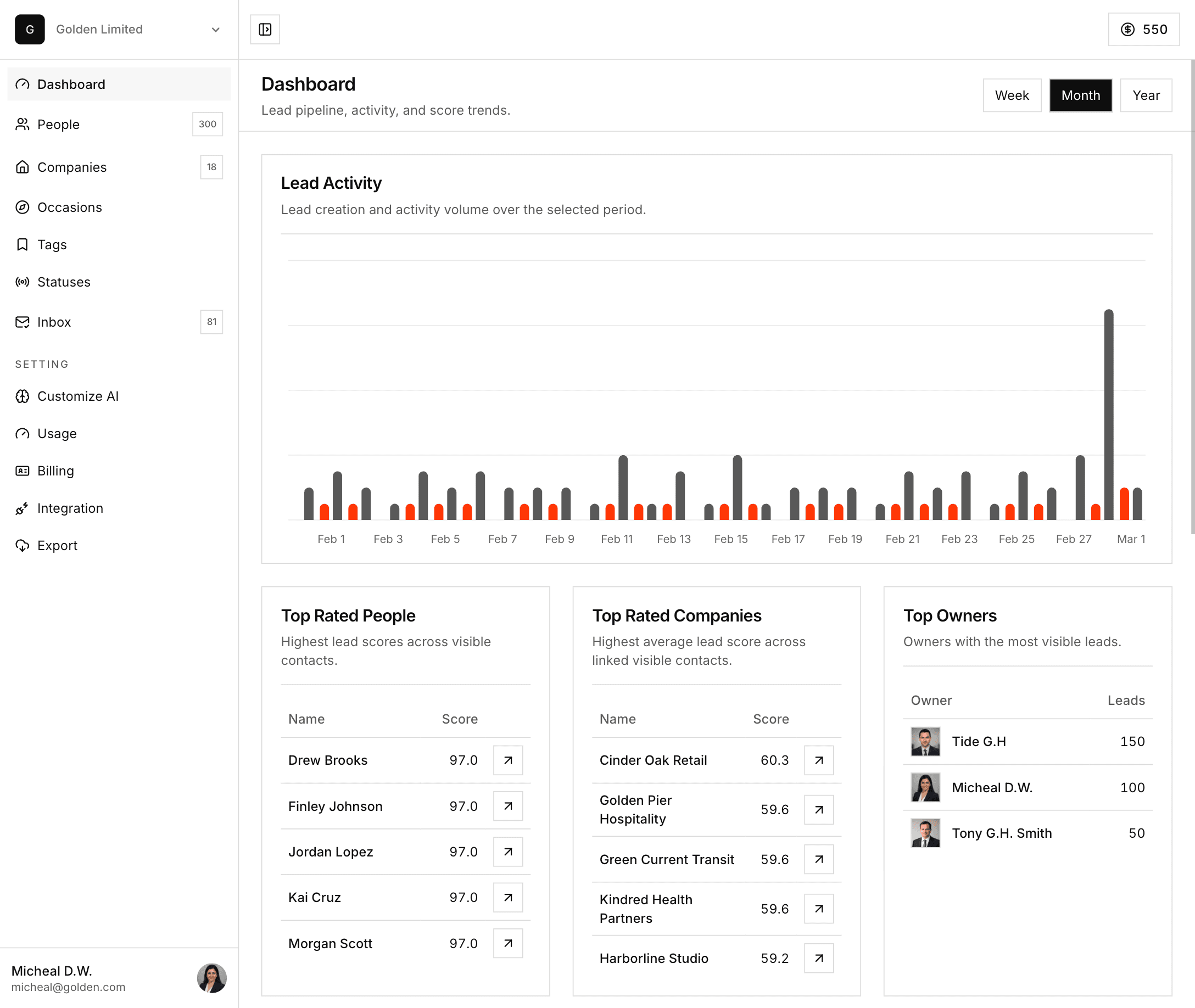
Every contact is scored by priority so your team can see which leads need immediate follow-up and which ones can wait.
Download clean CSV exports for email marketing, CRM imports, and reporting whenever you need your data elsewhere.
Keep everything in one place with shared visibility, contact ownership, and view permissions for the right people on your team.
Capture once, let CommuLand extract, review, score, and organize the lead before your team even opens the record.
Snap a card, upload an image, or forward a message without breaking the conversation.
For solo operators capturing leads and following up fast.
$5.99
Billed monthly
1 workspace seat
100 AI credits per billing cycle
Business card OCR
AI analysis & data validation
Lead scoring
Export contacts
Top-up credits at discount rate
For small teams sharing leads, ownership, and follow-up.
$9.99
Billed monthly
Everything in Solo, plus:
Up to 3 workspace seats
300 AI credits per billing cycle
Shared contact ownership & assignment
Team collaboration on contacts & activities
AI agent auto-analysis & lead scoring
Top-up credits at discount rate
For growing teams managing assignments and AI-assisted follow-up.
$19.99
Billed monthly
Everything in Solo, plus:
Up to 5 workspace seats
500 AI credits per billing cycle
Shared contact ownership & assignment
Team collaboration on contacts & activities
AI agent auto-analysis & lead scoring
Top-up credits at discount rate
For organizations running lead capture and AI workflows at scale.
$39.99
Billed monthly
Everything in Team, plus:
Up to 20 workspace seats
1000 AI credits per billing cycle
Organization-wide collaboration at scale
Priority AI processing queue
Bulk import & export tools
AI agent auto-analysis & lead scoring
Top-up credits at discount rate
10 free credits included. Top-up credits: 100 for $2.99 · 500 for $9.99 · 1000 for $19.99.
AI tracks score movement, activity spikes, and pipeline risk so your team can focus on the hottest leads first.
You can snap a business card, upload an image, or forward a message or photo to the Telegram agent. CommuLand extracts the details and turns them into a CRM contact automatically.
OCR 3.0 is CommuLand's extraction layer for business cards. It is built to read messy layouts, multilingual cards, and hard-to-parse fields more accurately before the AI review step.
No. You can use CommuLand with card scans and uploads only. Telegram is optional, but it is the fastest way to forward contacts, messages, and images into your workspace.
After extraction, the AI agent reviews the contact, generates a short summary, applies lead scoring, and suggests the next follow-up action so your team can move faster.
Lead scoring helps your team see which contacts deserve immediate attention. Instead of sorting through raw card data, you get a clearer priority order for follow-up.
Yes. CommuLand keeps contacts in one shared workspace with visibility, ownership, and view permissions so the right people can see and work on the right records.
Yes. New workspaces start with 10 free credits and no card required. Subscription credits refresh with your billing cycle, and top-up credits stay available until you use them.